
Primary 5 JH
Numeracy - April - June 2026
Numeracy:
Number
- multiply three-digit numbers by a one-digit number using formal written layout.
- add and subtract numbers with up to 4 digits using the formal written methods of columnar addition and subtraction where appropriate.
- estimate and use inverse operations to check answers to a calculation.
- extend understanding of the number system and decimal place value to hundredths *
- recognise and write decimal equivalents of any number of hundredths
- find the effect of dividing a one- or two-digit number by 10 and 100, identifying the value of the digits in the answer as ones, tenths and hundredths.
- compare numbers with the same number of decimal places up to two decimal places.
- solve addition and subtraction two-step problems in contexts, deciding which operations and methods to use and why.
- use factors and multiples to recognise equivalent fractions and simplify where appropriate [for example, 6/9 = 2/3 or 1/4 = 2/8 ]
- recognise and show, using diagrams, families of common equivalent fractions
- add and subtract fractions with the same denominator
- solve simple measure and money problems involving fractions
Measures
- measure and calculate the perimeter of a rectilinear figure (including squares) in cm and m
- find the area of rectilinear shapes by counting squares
- convert between different units of measure (capacity)
- estimate, compare and calculate different measures (capacity)
- estimate, compare and calculate different measures, including money in pounds and pence
Shape & Space
- compare and classify geometric shapes, including quadrilaterals and triangles
Handling Data
- interpret and present discrete and continuous data using appropriate graphical methods, including bar charts and time graphs
• solve comparison, sum and difference problems using information presented in bar charts, pictograms, tables and other graphs
ICT - January - March 2026
Using ICT
Understand how to keep safe on the Internet and display acceptable online behaviour.
Explore: Carry out a series of instructions using a digital device or environment.
Express: Create and edit text onscreen, combining images and/or sound.
Exchange: Identify and talk about ways of communicating digitally.
Evaluate: Talk about how to improve their work
Exhibit: Save their work.
Literacy - April - June 2026
Literacy:
Reading
Know how to access and use a range of resources to find information.
Know and understand the purposes of a persuasive text.
Evaluate advertisements as a form of persuasive writing for their impact, appeal and honesty, focusing in particular on how information about the product is presented: exaggerated claims, tactics for grabbing attention, linguistic devices, e.g. puns, jingles, alliteration, invented words.
Writing
Summarise in writing the key ideas from a paragraph or chapter.
Improve the cohesion of written texts by organising information into paragraphs.
Write poetry based on the structure and style of poems read.
Design an advertisement, such as a poster or radio jingle on paper or screen, e.g. for a school fete or an imaginary product, making use of linguistic and other features learnt from reading examples.
Choose and combine words, images and other features for particular effects with the aim of persuading an audience.
Use a neat, joined and legible handwriting style consistently across the curriculum.
Use ICT for drafting and revising as well as producing a finished piece.
Use layout, format, graphics and illustrations for different purposes.
Develop speed and accuracy when typing.
Sentence Construction and punctuation
Identify the common punctuation marks including commas, semi-colons, colons, dashes, hyphens, speech marks and respond to them appropriately when reading
Understand how the grammar of a sentence alters when the sentence type is altered, when, e.g. a statement is made into a question, a question becomes an order, a positive statement is made negative, taking note of:
- the order of words/verb tenses
- additions and/or deletions of words
- changes to punctuation.
Use adverbs and conjunctions to establish cohesion within paragraphs.
World Around Us - April - June 2026
World Around Us
Through the topic of The Terrifically Terrible Tudors we will learn:
Geography
- About the location, size, shape and use of common landscape features (P, I, COT)
- To recognise places and features, local and global, on a plan, map or photograph (P)
- To use standard references e.g. Globe, Atlas (P)
History
- To identify characteristics of a specific time period e.g. changes in transport/communications/ inventions (I, COT)
- To investigate how people used to live, including roles and responsibilities in society, and how these have changed (I, COT)
- To recognise that local/global events in the past have helped shape who we are and how we live today (I & P)
- Identify some buildings which have been used for different purposes in the past (P, COT)
Science and Technology
- That some materials will dissolve in water, others will not (COT)
- That some changes are reversible or irreversible, desirable or undesirable(COT)
- That a complete circuit is needed for electricity to travel (M&E)
- To recognise properties of materials including strength, flexibility, transparency, waterproofing, hardness/softness, conductor/insulator, magnetism and how these affect their use (I, P)
Using ICT
Understand how to keep safe on the Internet and display acceptable online behaviour.
Explore: Carry out a series of instructions using a digital device or environment.
Express: Create and edit text onscreen, combining images and/or sound.
Exchange: Identify and talk about ways of communicating digitally.
Evaluate: Talk about how to improve their work
Exhibit: Save their work.
Complete CCEA Task- Design a Leaflet Part 1. (Explore 1, Express, Evaluate, Exhibit) Desirable Features: Desktop Publishing. Children will use Microsoft Publisher to produce a single-fold leaflet. They will select and insert appropriate images and position them correctly. Insert appropriate text making sure that punctuation and spelling is correct. Make changes to work if they need to. Save work giving it a suitable file name.
Contact Details
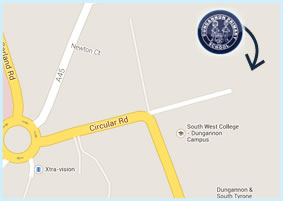
Dungannon Primary School,
Circular Rd,
Dungannon,
County Tyrone,
BT71 6BE
T: 028 8772 2250